Peachoid Labs
PL-USB20-SW1
Single-Port USB 2.0 Hub with Per-Port Power Switching and Persistent USB Identity
Software-controlled USB port power switching for physical VBUS ON/OFF and power cycling, with a unique serial number for stable identification of its physical USB pathway.
- USB 2.0 High-Speed, up to 480 Mbit/s
- USB VBUS ON / OFF / power cycle
- Use the module’s serial number to identify the USB connection it controls.
- Supports up to 2.0 A connected-device load†
- Current limiting, short-circuit protection, and output discharge
- Compatible with
uhubctl(Linux/macOS) andvhfilter(Windows)
† Subject to available upstream source current.
$39.95 USD + shipping
Availability: Pre-launch — not yet available for purchase.
Purchase qualification: for product or software development, system integration, evaluation, or OEM further-fabrication use. Read purchase conditions.
Returns: Limited to verified product issues. See the returns policy for details.
Overview
Physical USB VBUS control.
Many commodity USB hubs do not provide functional physical per-port VBUS switching, even when their hub controller supports power-control commands. The PL-USB20-SW1 is designed around actual USB VBUS switching for software-controlled disconnect and power-cycle applications.
Each module has a unique USB serial number. Host software can use that serial to identify a physical USB connection and associate it with the device it serves, even when Windows or Linux assigns a different COM or tty path. This is useful for non-serialized devices and identical devices. Once the association is known, software can target that module for VBUS ON, OFF, or a power cycle.
Engineering applications
Typical integration uses.
- Automated hardware testing, CI rigs, and production-test fixtures
- Embedded development and hardware-in-the-loop (HIL) systems
- Manufacturing fixtures and OEM equipment integration
- Remote labs, device farms, and unattended equipment
- AI and robotics hardware test systems
- Remote recovery of cameras, serial adapters, modems, scanners, and similar USB peripherals
Automation workflows
One module. One device.
Use the module’s serial number to identify the USB connection it controls. The attached device does not need its own serial number or a fixed COM-port or tty path, and software can reconnect to its current path when USB topology or device paths change.
Useful for test fixtures, remote recovery, and setups with multiple USB devices.
Automated recovery. A watchdog, test runner, or other host application can identify a module by serial number, switch VBUS off and on, and wait for the downstream device to re-enumerate. The host application remains responsible for device discovery and reconnection.
See the technical documentation for uhubctl on supported Linux/macOS hosts and vhfilter on Windows.
Multi-unit installation
Individual modules on a USB hub.
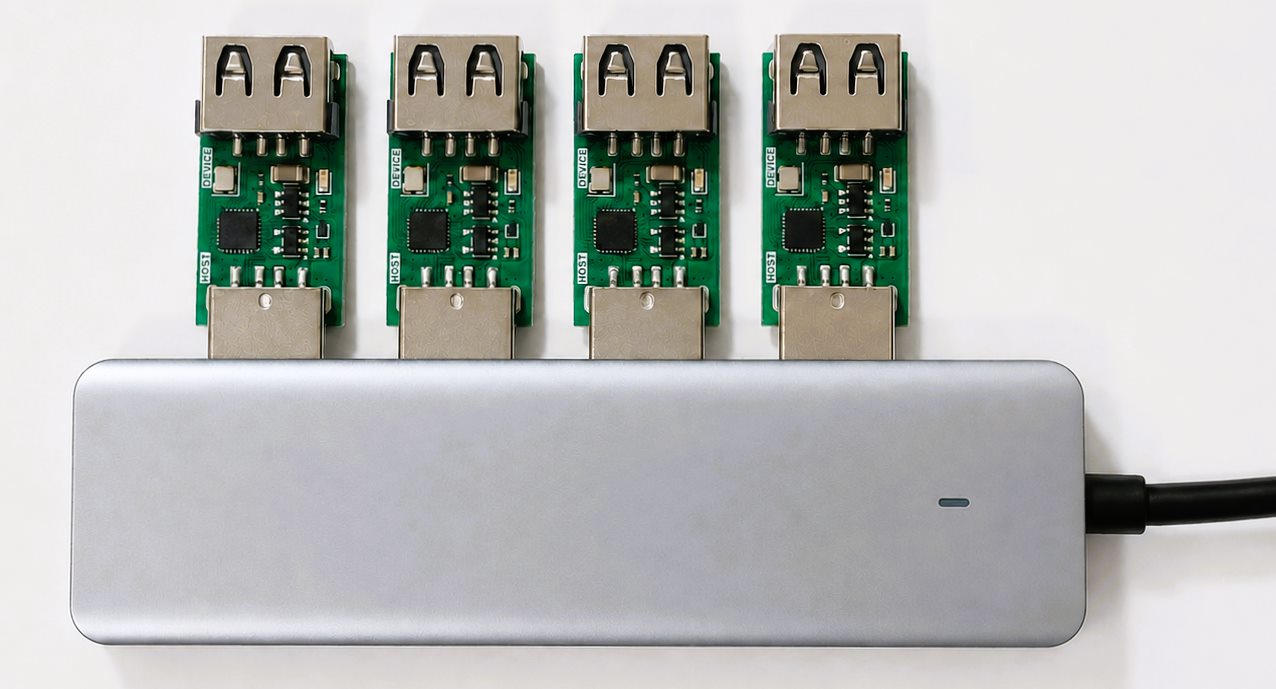
Connect one module per controlled device through a conventional USB hub or directly to separate USB ports on the host. Each PL-USB20-SW1 appears as an independent managed USB hub with its own serial number.
Technical summary
Technical specifications.
| USB | USB 2.0 High-Speed, up to 480 Mbit/s |
|---|---|
| Connectors | USB-A male upstream / USB-A female downstream |
| Dimensions | 44.5 × 15.5 × 9.2 mm (L × W × H), nominal |
| Managed function | Per-Port Power Switching (PPPS): VBUS ON / OFF / power cycle |
| Load capability | Up to 2.0 A, subject to upstream source capability |
| Fault protection | Current limiting, short-circuit and thermal protection; automatic recovery after a fault clears |
| Output discharge | Switched VBUS is discharged when the port is disabled |
| Status indicator | Green LED on when downstream VBUS is enabled; off when downstream VBUS is disabled |
| Module power | Powered from upstream USB VBUS |
| Operating current | 20 mA typ. (Full-Speed); 33 mA typ. (High-Speed) |
| Third-party control tools | uhubctl on Linux/macOS; VirtualHere vhfilter on Windows |
| Identification | Factory-programmed unique USB serial number per unit |
Documentation
Technical documentation.
The technical documentation includes quick-start connection guidance, serial-number identification, uhubctl command patterns, multi-unit installations, and troubleshooting.
Software. Use uhubctl on Linux or macOS where supported by the host and operating system. On Windows, use VirtualHere's vhfilter.
FAQ
Frequently asked questions.
What makes this device special?
Connect the module inline with a USB device. Each module has its own permanent, factory-programmed USB serial number. Software can use that identity to find the physical USB connection it controls, even when the attached device has no serial number or the operating system changes its COM or tty path.
Why not use a normal USB hub?
Many standard USB hubs do not implement physical per-port VBUS switching. The PL-USB20-SW1 combines software-controlled downstream USB power with a unique module serial number for persistent USB device identification.
What is persistent USB identity?
The module’s unique serial number identifies the physical USB connection even when the operating system changes the attached device’s COM or tty path—for example, from COM17 to COM23.
How does it work with the PL-USB20-SW1?
Host software identifies the module by its serial number, then finds the downstream device and its current COM or tty path. For example, module 100001 may connect a device that appears as COM17 and later COM23.
Does it keep a serial device on the same COM/tty port?
No. The operating system assigns COM and tty paths. Host software can use the module serial to find the current path, but a fixed assignment is not guaranteed.
Where is this useful?
Multiple identical devices, devices without serial numbers, test fixtures, remote systems, and automated test systems.
Can automation software control the module?
Yes. Host software can invoke the same uhubctl or vhfilter commands as other automation software. The module provides a deterministic USB power-control action that host software can use when a connected device needs recovery.
Support
Questions about setup or integration?
Contact [email protected] for product or integration questions.